By: Alex Turgeon, President at Valere
TL;DR: 3 Key Takeaways
- The interface is dissolving — We’re shifting from Software as a Service to Agents as a Service, where the UI collapses from navigation across multiple apps into orchestrated feeds that bring decisions to you, not the other way around.
- Successful AI meets people where they are — The best AI implementations don’t force users to learn chat interfaces; they embed intelligence into familiar tools like spreadsheets and inboxes, requiring users to change their mindset from operator to manager without changing their environment.
- Trust is built through transparency and control — Effective AI interfaces expose reasoning traces, provide autonomy sliders, and visualize confidence levels, allowing users to progressively automate as trust is earned rather than demanding blind faith upfront.
For over two decades, our digital work lives have been defined by a single paradigm: Software as a Service. We’ve learned to navigate endless tabs, memorize click-paths, and act as human routers between disconnected applications. But this era is ending, not with a bang, but with a disappearing act.
Welcome to the age of Agents as a Service, where the interface isn’t just changing, it’s dissolving, and the best AI might be the one you never see.
The End of the Application Era
Here’s the uncomfortable truth about SaaS: it made us work for it.
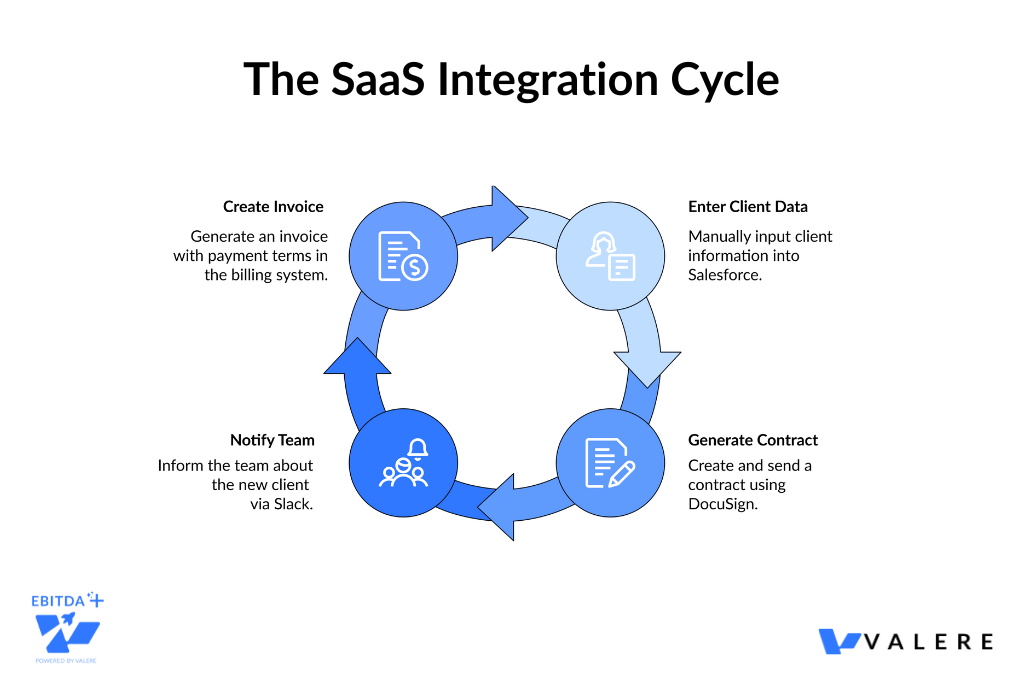
Every time you onboard a client, you’re the one translating business intent into a choreographed sequence across Salesforce, DocuSign, Slack, and your billing system. The software provides the tools, but you provide the intelligence, the routing logic, and the grunt work.
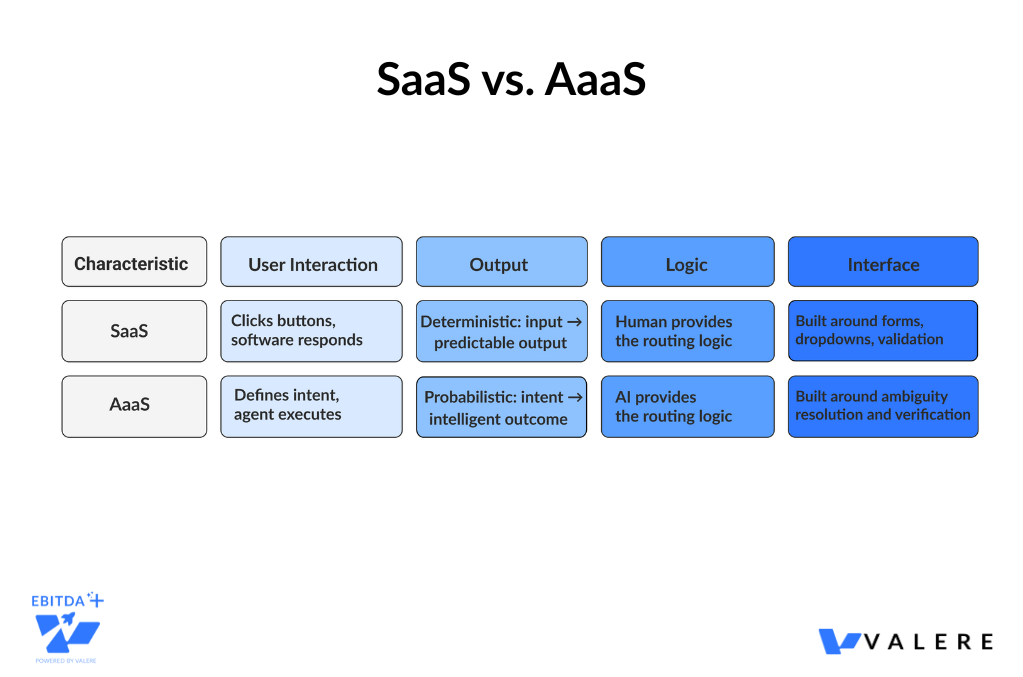
Traditional SaaS applications are essentially databases wrapped in web forms. They’re deterministic machines designed around a simple premise: humans click buttons, software responds predictably. Click Save, get a success message. Fill out Form A, unlock Feature B.
But AI agents don’t work this way. They’re probabilistic. Ask an agent to draft a marketing plan, and you might get brilliance, mediocrity, or a confidently-written hallucination. This fundamental shift from deterministic to probabilistic computing demands a complete rethinking of how interfaces work.
The Interface as Barrier
The old SaaS UI was built around input restriction. Dropdown menus, validation rules, and required fields designed to prevent you from making mistakes. The new AI interface needs to be built around ambiguity resolution and verification. Helping the AI understand what you want and helping you validate what it delivers.
The interaction model shifts from filling forms to negotiating intent.
The Old Dog Problem: Why Radical UIs Fail
Here’s where most AI products stumble: they ask people to completely relearn how they work.
Consider the knowledge worker who’s spent 15 years building muscle memory around Excel. The visual-spatial understanding of where data lives, how formulas cascade, the rhythm of Ctrl+C, Ctrl+V. Now hand them a chat interface and tell them to describe their spreadsheet tasks in natural language.
The cognitive load is enormous. You’re not just learning a new tool. You’re translating your entire mental model from visual-spatial to linguistic. This is why so many powerful AI tools get abandoned after the initial excitement fades.
Meeting People Where They Are
The solution isn’t to build better chatbots. It’s to package unfamiliar AI capabilities inside familiar interface metaphors.
The Supercharged Spreadsheet Don’t replace Excel with an AI assistant. Instead, create a spreadsheet where the formulas are agents. The user still sees rows and columns, their comfort zone, but now a cell can contain an agent that researches companies, pulls financial data, or analyzes sentiment from news articles. The mental model stays the same. The capability is additive.
The Inbox as Command Center For many professionals, email is the primary to-do list. An HR agent shouldn’t force users to a new portal. It should manifest as an email thread where you can reply Approve or ask follow-up questions. The interface is familiar. The intelligence behind it is new.
This is the principle of Invisible AI: don’t create a new way of working. Create a better version of the familiar way.
The Education Gap
But even invisible AI requires a shift in mindset, from operator to manager. In our work at Valere, implementing AI systems for mid-market businesses, we’ve found that the technical deployment is often easier than the human side. Most companies lack the internal expertise to manage AI effectively, and standard software training doesn’t address the specific skills needed.
We built our education division, Valere Learning, after watching promising AI implementations stall because users didn’t know how to set guardrails, interpret confidence scores, or review exceptions. These aren’t skills that exist in traditional software training. As software moves toward agent-based architectures, the workforce needs to learn how to manage AI rather than fear it.
The lesson from these deployments: successful AI isn’t just about the technology. It’s about preparing humans for a fundamentally different relationship with their tools.
Generative UI: Interfaces That Draw Themselves
Traditional software has pre-built screens for every scenario. But AI conversations are infinite in variety. How do you pre-design a UI for every possible user intent?
You don’t. You let the AI generate the interface in real-time.
The Spectrum of Generation
Static Generation The system maintains a library of high-quality components: a weather card, a stock graph, an approval form. The agent analyzes your intent and selects the right one. This is the safest approach for enterprise. Brand-consistent, tested, and predictable.
Declarative Generation The agent generates a structured schema describing a custom layout, perhaps combining a list of sales leads with a map of their locations. Assembling components that were never explicitly designed to work together.
Open-Ended Generation The agent writes raw code to build an interface from scratch. Powerful, but risky for enterprise environments due to security and accessibility concerns.
Seven Patterns for Human-AI Coexistence
The industry is converging on specific spatial layouts that define how humans and agents share screen space.
The Sidebar Colleague Think Microsoft Copilot. The agent lives in a collapsible panel, observing your primary work without interrupting it. Like having an expert colleague looking over your shoulder, ready to help but not intrusive.
The Inline Ghost Like Notion AI, the agent appears right at your cursor. High context, low friction. Perfect for micro-tasks like rewriting a sentence or summarizing a paragraph.
The Collaborative Canvas Agents work alongside you on an infinite whiteboard like Miro or Figma, generating sticky notes or diagrams as collaborators. Crucial when multiple agents need to cooperate, giving you spatial organization to understand complex workflows.
The Distributed Grid Agents inhabit spreadsheet cells, enabling high-throughput batch processing. One agent per row, researching companies, enriching data, finding patterns.
The Strategic Partner A persistent chat panel stays open while the main workspace updates. Ideal for iterative co-creation, like coding or writing.
Center Stage The conversation is the interface, like ChatGPT. Effective for dialogue, less so for managing complex state.
The Invisible Agent No UI at all. Pure background processing with notification-only output.
Making Thinking Visible
AI takes time to think. Without feedback, users assume the system has frozen. The solution is exposing the agent’s reasoning trace. A thinking panel that shows:
- Analyzing request…
- Searching CRM for similar clients…
- Finding pattern anomalies…
- Generating report…
This serves three purposes. It prevents anxiety about stalled systems. It builds trust through transparency. And it enables course-correction. If the agent searches the wrong database, you can stop it immediately.
The Trust Architecture: Five Levels of Autonomy
The single biggest differentiator in AI UX is how it handles trust. Too little control, and users reject the system. Too much trust, and catastrophic errors slip through.
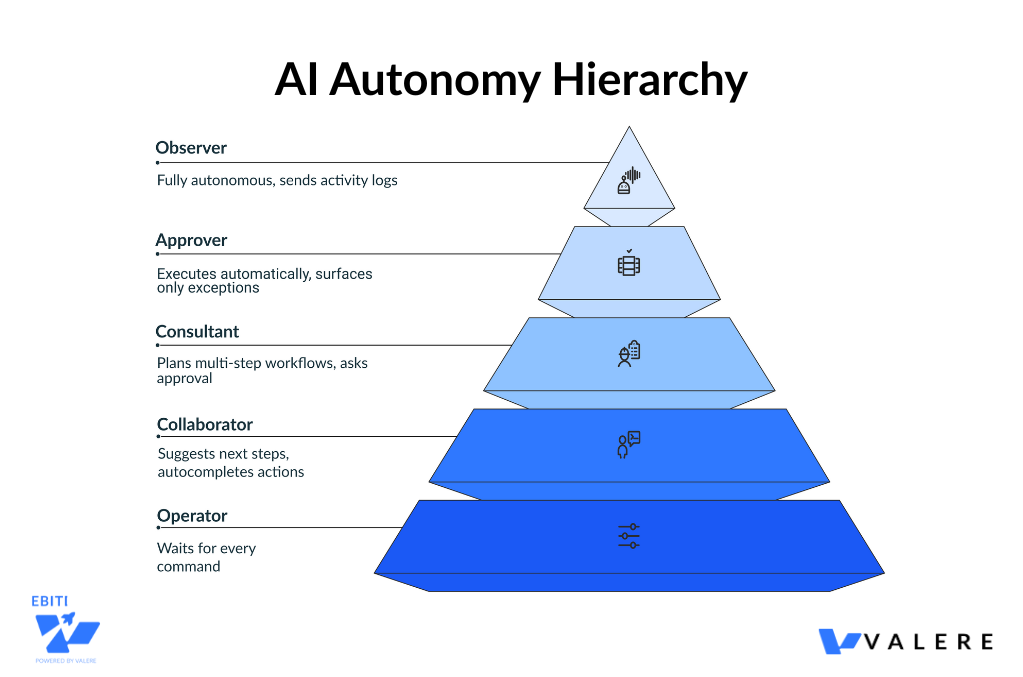
Agents operate at different autonomy levels, and the UI must adapt.
Level 1: Operator The agent waits for commands. You’re the driver. UI needs: chat inputs, buttons, hotkeys.
Level 2: Collaborator The agent suggests next steps, autocompletes actions, sends proactive notifications. You’re the co-pilot.
Level 3: Consultant The agent plans multi-step workflows, but you approve before execution. You’re the manager. UI needs: proposed action cards, plan visualizations.
Level 4: Approver The agent executes automatically, surfacing only exceptions for your review. You’re the auditor. UI needs: exception queues, batch approval lists.
Level 5: Observer The agent is fully autonomous. You’re passive, receiving only activity logs and periodic check-ins.
The Autonomy Slider
A powerful UI pattern: let users set the agent’s freedom level.
Low setting: Ask me before every action Medium setting: Ask me only before sending emails or spending money High setting: Only interrupt if confidence is below 80%
Even if users keep it on high, the existence of the control provides psychological safety. Protection against rogue AI.
From Navigation to Orchestration
Navigation means moving the user to the data. Orchestration means bringing the data to the user.
Instead of opening Salesforce, then Jira, then DocuSign to find your to-dos, imagine an action feed that aggregates everything:
- Approve Invoice #123 from Coupa
- Review Contract from DocuSign
- Resolve Support Ticket #456 from Jira
You clear the feed. The source applications become invisible. You interact with decisions, not databases.
This is the UI collapsing multiple apps into a single stream of judgment calls.
Real-World Orchestration: Collapsing the Silos
In our work with a Mid-Market residential and commercial plumbing, heating, and renovation services company, we saw this shift play out in practical terms. The company had been running on a fragmented ecosystem: Smartsheet for scheduling, text messaging for crew communication, email for customer updates. Dispatchers spent their days manually navigating between these systems, acting as human routers.
We built them a unified platform where AI operates across all these functions. The system automates crew assignments and dispatching based on location, skills, and availability. The dispatcher’s role fundamentally changed. Instead of manually juggling spreadsheets, they now manage the AI’s logic and handle exceptions.
The UI shift was subtle but profound. Instead of multiple application windows, dispatchers see a single orchestrated view where the AI presents decisions that need human judgment, while routine assignments happen invisibly in the background.
This is orchestration in action. The data comes to the user, not the other way around.
The Network of Intelligent Agents
The backend is dissolving into networks of cooperating agents. But this creates a new challenge: how do you orchestrate multiple AI agents working together?
Orchestrating Multi-Agent Workflows
We built Conducto, our orchestration framework, specifically to handle agentic, nonlinear workflows. Instead of static business logic coded by developers, Conducto uses a coordinator to manage various agents that execute defined strategies. The system ingests proprietary intelligence via our research tool, Dactic, and coordinates agents to act on it.
Here’s what this means in practice.
Traditional workflow: A research analyst manually searches for market data, copies it to a spreadsheet, writes an analysis, creates a presentation, sends it for review.
Agent-orchestrated workflow: The user defines the strategy. I need competitive analysis on Company X with focus on their pricing model. The orchestrator dispatches a research agent to gather data, sends findings to an analysis agent to identify patterns, routes the analysis to a writing agent to draft insights, and coordinates a formatting agent to create the deliverable.
The user doesn’t navigate between tools. They define outcomes, and the agent network executes the workflow.
The UI challenge becomes: how do you visualize this cooperation? We use a combination of flow diagrams showing agent handoffs and a persistent chat where users can intervene at any handoff point.
This represents the future. Users don’t manage applications. They conduct orchestras of specialized agents.
When Things Go Wrong: Exception Management
In high-volume scenarios, the happy path should be invisible. An autonomous finance agent reconciles 10,000 invoices. 9,950 match perfectly and process silently. You never see them.
You only see the 50 exceptions, grouped by type:
- PO Missing: 12 items
- Amount Mismatch: 38 items
For each, the agent pre-investigates:
I found a mismatch. Invoice says $500, PO says $450. I checked the email thread. Vendor mentioned a price increase, but the PO wasn’t updated.
Your options: Accept Price Hike or Escalate to Manager.
This is the shift from Do to Review. The UI optimizes for rapid decision-making based on AI-gathered evidence, not data entry.
Confidence Visualization: Honesty About Uncertainty
An agent should never present a guess as a fact.
High confidence over 90%: Present normally Medium confidence 70-90%: Highlight or flag with verify badge Low confidence under 70%: Collapse the result, ask for manual review
When a Large Action Model is 60% sure about which button to click on a legacy website, it should show you a screenshot and ask for confirmation. Transparency about uncertainty is how you build trust.
The Technical Enablers
Two technologies make this future possible.
Model Context Protocol
MCP is a standard that lets agents connect to any data source without custom integrations. This enables bring-your-own-tools functionality. Plug in Google Drive, Slack, or local databases instantly. It also enables context portability. Start a task on mobile voice, finish it on desktop. The agent remembers everything.
Large Action Models
Agents that can see screens and click buttons, bridging the gap to legacy software. The UI becomes teachable. Demonstrate a workflow once, the model learns to replicate it.
Visual feedback might show a ghost cursor navigating the screen, so you know the agent is working.
Industry Applications
Finance Continuous close, zero-touch operations. Every ledger entry links back to the natural language reasoning and source invoice the agent used. Full audit trail for compliance.
HR Personalized onboarding timelines that update as the agent completes tasks. Laptop ordered, Slack created. With conversational guidance through policy documents.
Supply Chain When disruption hits, port strike for example, the agent presents three scenarios. Fastest, cheapest, safest. With simulated impact on inventory before you commit.
Government Contracting In our work with an AI platform for government contractors, we’ve seen how AI can become a background governance layer. We built their platform on AWS GovCloud to integrate document intelligence, compliance checks, and team formation directly into the government capture lifecycle.
Rather than manually checking every compliance requirement, the AI filters opportunities and validates strategy in the background. The user interface serves primarily to audit the AI’s findings and approve recommendations. Governance, not data entry. This transforms capture from reactive paperwork into proactive strategy, with the AI handling the invisible complexity of federal compliance.
The Invisible Future
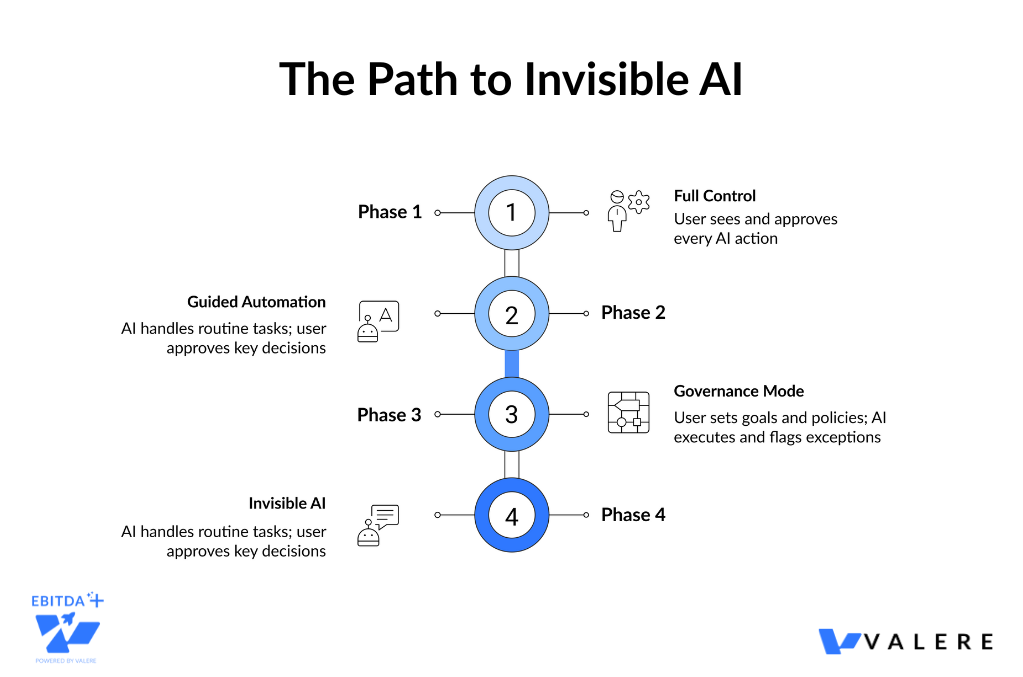
The trajectory is clear. As confidence scores rise and trust is established, the dashboards recede. The UI becomes primarily a mechanism for governance, setting goals and policies, and audit, reviewing outcomes.
But we’re not there yet. The old dog problem remains the gatekeeper. Users are accustomed to being drivers. Becoming managers of an AI workforce requires not just new interfaces, but new mental models.
The best agent-based interfaces will start with high visibility and control, teach users how to manage them, progressively automate as trust is earned, and eventually fade into the background.
The Paradox of Invisible AI
The most successful AI won’t announce itself. It will embed in spreadsheets, inboxes, and feeds. It will feel like a superpower version of tools you already know.
And one day, you’ll realize you’re not managing applications anymore. You’re managing outcomes.
From our experience building these systems, we’ve learned that the technical challenge is only half the battle. The other half is human: building trust through transparency, meeting people in familiar interfaces, and teaching them to become conductors rather than performers.
The best interface might be no interface at all. Just a notification:
It’s done.
Start Building Invisible AI
Interested in seeing where UX/UI can intersect AI? Our AI Maturity Assessment shows where your company stands today and what to prioritize next. What you’ll get in minutes:
- Your AI maturity score (0–5)
- Tailored recommendations for immediate impact
- A concise assessment you can bring to the next meeting
Take the assessment here: valere.io/ai-maturity-assessment/